
Free engineering tools and field guides for industrial data
Calculate OEE, decode Modbus and PLC values, plan OT subnets and size your data budget in the browser. Then read the guidance behind each result in 74 technical articles and 6 PDF guides, in Turkish and English.
Free, no account needed. Everything you enter stays in your browser.
PLC / SCADA
Collect
- Modbus TCP, port 502
- OPC UA, port 4840
Register 400012,400
Edge / IIoT
Add context
- MQTT over TLS, port 8883
- Buffer and timestamp
Topic line1/count2,400 pcs
Analytics
Turn into a decision
- OEE
- MTBF and MTTR
OEE79.2%
10 browser tools
Start with a file, a shift or a connection. Results are computed in your browser and nothing you type is uploaded.
Production efficiency
OEE Calculator
Turn shift data into availability, performance and quality insights.
Process Unit Converter
Convert pressure, temperature, flow and other process units in batches.
Connectivity & protocols
PLC Data Type Converter
Check byte order, numeric data types and engineering scales.
OT Network Calculator
Plan IPv4 subnets, address ranges and available hosts.
Modbus Frame Builder
Build RTU/TCP requests, inspect bytes and validate CRC checksums.
Data & analytics
Sensor Data Analyzer
Inspect CSV data for variation, trends and outliers.
Industrial Data Converter
Convert and scale CSV, JSON and Modbus register data.
Sensor Data Generator
Generate multi-channel test data with noise, trends and anomalies.
Project planning
IT/OT Readiness Assessment
Assess your starting point and build a prioritized action plan.
IIoT Data Budget
Estimate data volume from tag count, sampling and retention.
Try three calculations here
The same functions the full tools use. Move a slider or type a value; your input stays in your browser.
Three factors, one number
OEE is the product of availability, performance and quality. See how a small loss in each one compounds.
One number, four byte orders
A 32-bit IEEE 754 number split across two 16-bit Modbus registers can arrive in four different orders depending on the device. Type a value and see the difference.
Which order a device uses is vendor-specific; check its documentation.
See inside a subnet
Enter an IPv4 address with CIDR and get the network, broadcast address and usable range instantly.
Start from the problem you are solving
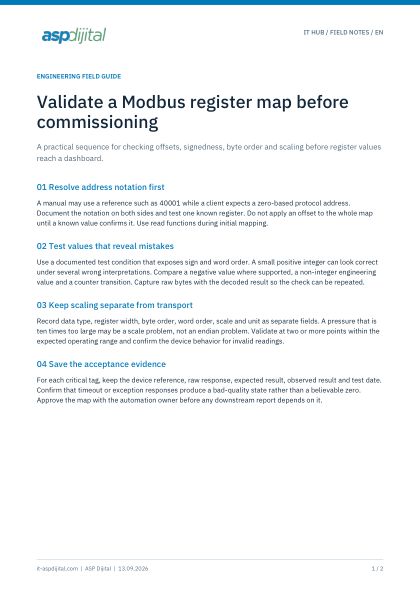
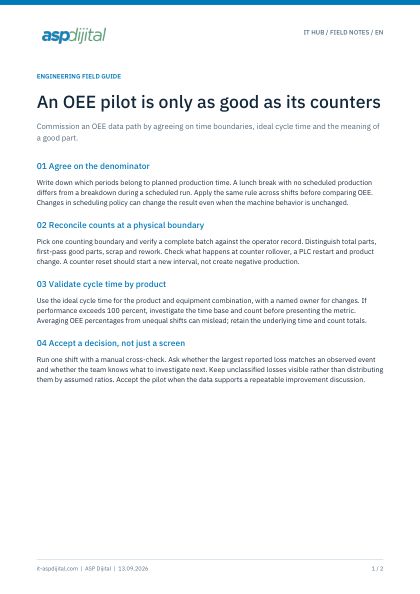
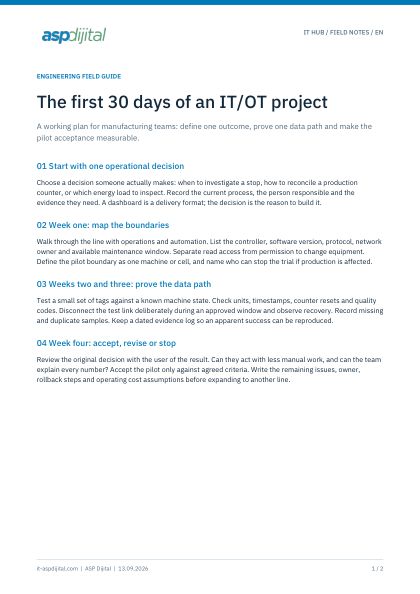
Each path combines a tool, the articles that explain it and, where one exists, a PDF checklist.
Make production losses visible
OEE calculations, shift data and measurable improvement steps.
Connect machines and business systems
Practical integration guidance for Modbus, OPC UA and MQTT.
Plan the starting point of your IT/OT project
Assess data quality, security and operational readiness.
Make your OT environment secure and recoverable
Asset inventory, network zones, remote access and backups you have actually restored.
Browse by topic
Each topic hub lists its articles in a suggested reading order, with the related tools and PDFs.
OEE & production efficiency
Practical guides to OEE, MTBF and MTTR, loss analysis, alarm management and energy monitoring, with a free OEE calculator and a PDF checklist.
Industrial protocols: Modbus, OPC UA and MQTT
Guides to Modbus TCP/RTU, OPC UA and MQTT: addressing, byte order, security, QoS and topic design, with Modbus frame and PLC converter tools.
OT security & resilience
Practical OT security guides and checklists: IEC 62443, the Purdue model, network segmentation, remote access, backups and asset inventory.
Industrial data, historians & data quality
Guides to choosing a historian or data lake, retention and compression, data quality, time synchronization and sensor data analysis, with free data tools.
Edge computing & IIoT architecture
Guides to edge versus cloud placement, container-based edge, gateway updates, observability and IIoT architecture from PLC to business systems.
IT/OT project planning
Guides to starting IT/OT projects: a first-30-days plan, readiness assessment, pilot acceptance, a data contract and collaboration between IT and OT teams.
Checklists you can bring to a meeting
Discovery questions, commissioning checklists and project worksheets. Each is a short guide plus a worksheet for your team.
- Turkish and English
- No form to fill in
Latest articles
Time synchronization for industrial data: NTP, PTP and timestamp discipline
Why timestamps decide whether data can be trusted, where NTP is enough, when PTP is worth the effort, and how to choose a single time source and timestamp convention.
The 12 readiness questions explained: what evidence to collect
Each question in the IT/OT readiness worksheet explained: why it matters, what “verified” looks like and which evidence to bring to the kickoff meeting.
MQTT topic design for factories: a unified namespace you can maintain
How to structure MQTT topics with an ISA-95-style hierarchy, what belongs in the topic versus the payload, how retained messages and last will fit, and which anti-patterns to avoid.
Common questions
Are the IT Hub tools free?
Yes. All tools are free. No account or email address is required.
Where does the data I enter go?
Calculations and file processing run in your browser. Data entered in the tools is not sent to the server. A cookie stores only your language choice.
Who is behind IT Hub?
IT Hub is ASP Dijital’s open technical resource center for industrial digital transformation. For project-specific needs, reach the ASP Dijital team through the contact form.
Are the articles available in Turkish?
Field guides and newer articles are published with a complete Turkish translation. Archive articles that are not yet translated stay in English and are labeled EN.
Can I share the PDF resources with my team?
Yes. Share the PDFs and article links with your team, keeping the ASP Dijital attribution. No email or form is needed to download them.
Planning an IT/OT project?
Describe your machine, data flow or production goal in a few sentences and the ASP Dijital team will reply by email.